Email
Nextcloud has a mailer component to send email from an admin-defined account.
Basic usage
The mailer is hidden behind the \OCP\Mail\IMailer interface that can be injected:
<?php

use OCP\Mail\IMailer;

class MailService {
    private IMailer $mailer;

    public function __construct(IMailer $mailer) {
        $this->mailer = $mailer;
    }

    public function notify(string $email): void {
        $message = $this->mailer->createMessage();
        $message->setSubject("Hello from Nextcloud");
        $message->setPlainBody("This is some text");
        $message->setHtmlBody(
            "<!doctype html><html><body>This is some <b>text</b></body></html>"
        );
        $message->setTo([$email]);
        $this->mailer->send($message);
    }
}
Email templates
Most emails should not build their own HTML. IMailer::createEMailTemplate() returns an
\OCP\Mail\IEMailTemplate that renders a themed HTML email and a matching plain text version,
with dark mode support for the mail clients that have it. Attach it to a message with
IMessage::useTemplate():
$template = $this->mailer->createEMailTemplate('myapp.ProjectShared', [
    'project' => $projectName,
]);
$template->setLanguage($l->getLanguageCode());
$template->setSubject($l->t('%s shared a project with you', [$sharerName]));
$template->addHeader();
$template->addHeading($l->t('%s shared a project with you', [$sharerName]));
$template->addBodyText($l->t('You can now see and edit the project.'));
$template->addBodyButton($l->t('Open project'), $projectUrl);
$template->addFooter();

$message = $this->mailer->createMessage();
$message->setTo([$recipientEmail]);
$message->useTemplate($template);
$this->mailer->send($message);
The first argument of createEMailTemplate() identifies the email (<app>.<EmailName>), and
the second one passes data to custom templates (see Modifying the look of emails
in the administration manual).
Write the email in the recipient’s language: get an IL10N for their language from
\OCP\L10N\IFactory and pass its code to setLanguage(). The template then sets the right
lang and dir attributes, mirrors the layout for right-to-left languages like Arabic or
Hebrew, and writes the default footer in that language. Call it before addFooter().
Building blocks
Since Nextcloud 36, the template has blocks to show who an email is about, a highlighted note, a
card with details, and a row of buttons. Unlike addBodyText() with a separate plain text, these
blocks never take HTML: every value is escaped by the template, URLs included, and each block
writes its own plain text version.
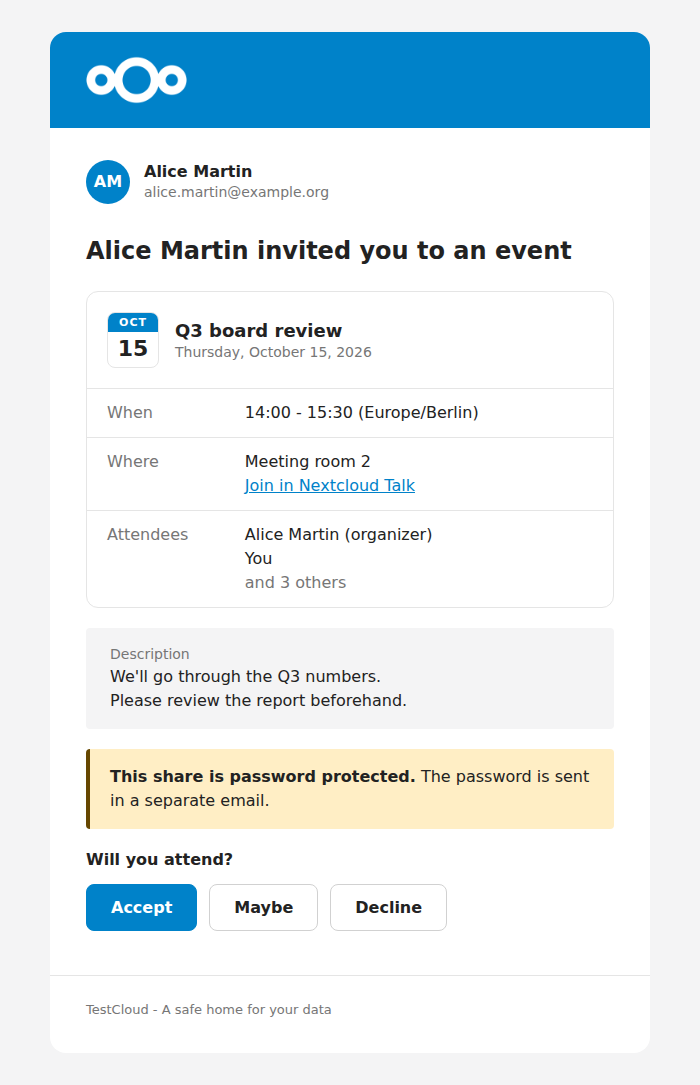
A sender, a details card, two notes and a row of buttons.
addBodySender()The person the email is sent for (sharer, organizer…), with an initials circle, their name and an optional second line such as their email address. Add it before the heading.
addBodyNote()A highlighted box. Use
IEMailTemplate::NOTE_NEUTRAL(the default) for text written by a user, like a share note or an event description, with the label shown above it. UseNOTE_INFO,NOTE_WARNINGorNOTE_ERRORfor messages from the server, with the label as a bold title. Line breaks are kept.addBodyDetails()A card describing an item: title, subtitle, an initials circle or a calendar badge, and labelled rows. See below.
addBodyButtons()Any number of buttons, the first one is the primary action, with an optional question above them like “Will you attend?”.
The details card is built with \OCP\Mail\EMailDetails. Each row holds one or more parts, each
rendered on its own line: plain text, a link, or muted secondary text.
use OCP\Mail\EMailDetails;
use OCP\Mail\IEMailTemplate;

$template->addHeader();
$template->addBodySender($organizerName, $organizerEmail);
$template->addHeading($l->t('%s invited you to an event', [$organizerName]));

$details = (new EMailDetails($eventTitle))
    ->setSubtitle($l->l('date', $start, ['width' => 'full']))
    ->setDateBadge($l->l('date', $start, ['width' => '~MMM']), $l->l('date', $start, ['width' => '~d']));
$details->addRow($l->t('Where'))
    ->text($location)
    ->link($l->t('Join in Nextcloud Talk'), $talkUrl);
$details->addRow($l->t('Attendees'))
    ->text($firstAttendee)
    ->muted($l->n('and %n other', 'and %n others', $remaining));
$template->addBodyDetails($details);

$template->addBodyNote($description, $l->t('Description'));
$template->addBodyButtons([
    ['text' => $l->t('Accept'), 'url' => $acceptUrl],
    ['text' => $l->t('Decline'), 'url' => $declineUrl],
], $l->t('Will you attend?'));
$template->addFooter();
Use setInitials($name) instead of setDateBadge() to show an initials circle, for example
for a conversation or a team. The badge strings are passed as is, so localize them yourself.
A short note about a shared item goes before its details card. Longer content, like an event description, goes after it.
Inline attachments
Inline attachments can be appended to a message with IMessage::attachInline:
/** @var IMessage $message */
$message->attachInline(
    "this is a test", // Body
    "test.txt",       // Name
    "text/plain"      // Content type
);
$this->mailer->send($message);